NNorvia Labs Explore mockups ↗
Technical Product Requirement · Course Build Brief

Build the connected
Norvia Labs platform.

One implementation brief for a multi-tenant university ecosystem spanning an AI campus experience, cross-tenant communications, and a central administration control plane.

01

Start here

High-level architecture

Three applications share identity, tenant context and a common Azure SQL data foundation. Intelli Campus adds the AI and retrieval layer; Norvia Backoffice governs provisioning.
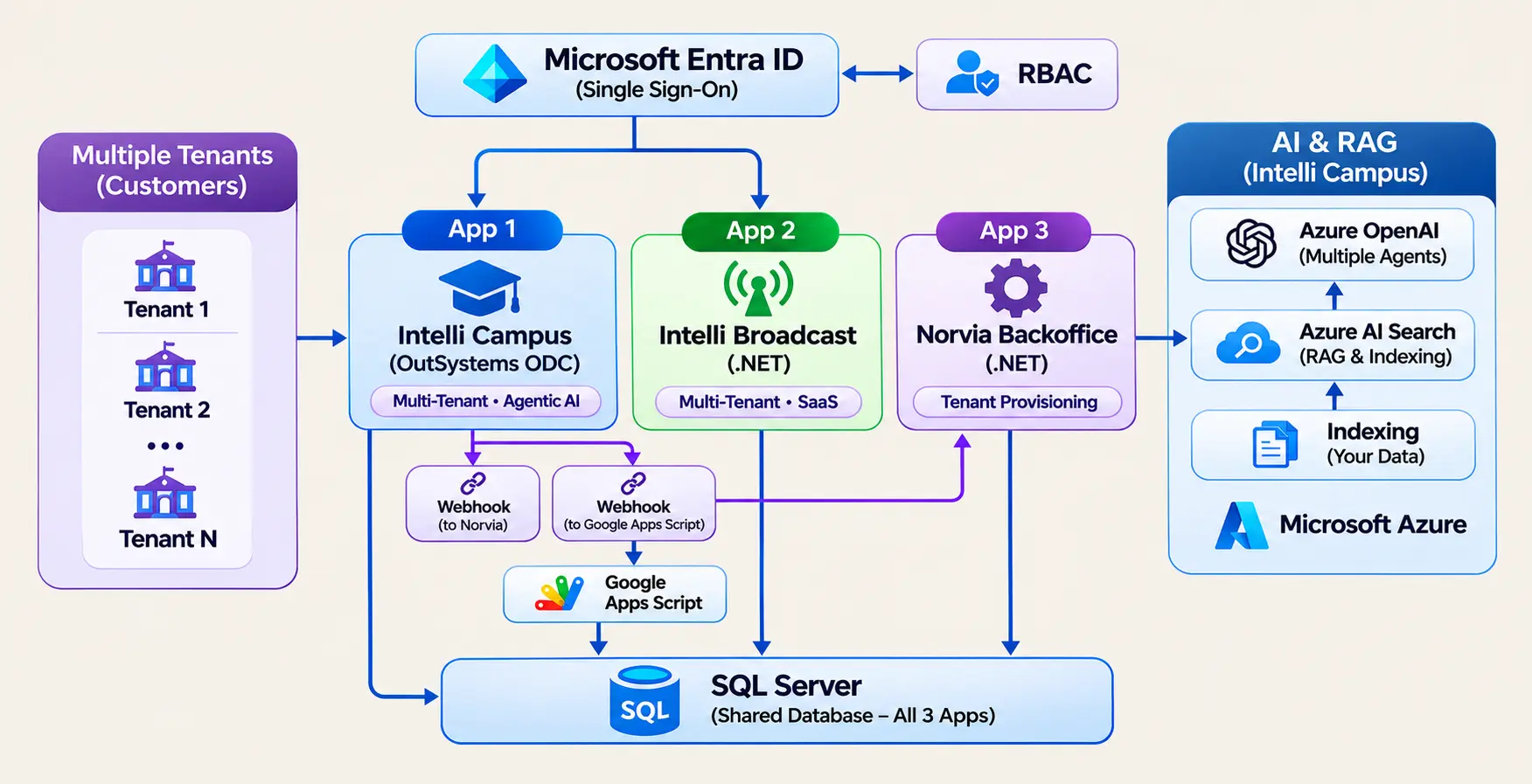
High-level Norvia Labs architecture showing multiple tenants, Microsoft Entra ID, RBAC, Intelli Campus, Intelli Broadcast, Norvia Backoffice, shared SQL Server, webhooks and Azure AI services.
Architecture baseline

Use this diagram as the target-state reference throughout all nine phases. Each phase introduces or strengthens part of this final platform.

Open full size ↗
01

One identity boundary

Microsoft Entra ID provides single sign-on, while server-side RBAC decides what each user can do in each product.

02

Tenant isolation by design

Every business record is resolved through trusted tenant context. Tenant identity is never accepted from browser-controlled input.

03

Shared data, clear ownership

Azure SQL connects the products, but each application owns its workflows and accesses only the data its contract allows.

04

AI grounded in university data

Azure AI Search indexes approved sources and Azure OpenAI answers through RAG and bounded agents.

02

End-to-end journey

How the platform works

From university onboarding to a student receiving a trusted answer, each system has a deliberate responsibility.

  1. 01
    ⌂

    Onboard university

    Norvia Operations creates the tenant, products, roles and tenant administrator in Backoffice.

    Norvia Backoffice
  2. 02
    ◎

    Provision access

    Product mappings are written to shared SQL and platform accounts are provisioned through governed APIs.

    Backoffice + Azure SQL
  3. 03
    →

    Sign in once

    The university user authenticates with Entra ID. Tenant and role are resolved on the server.

    Entra ID + RBAC
  4. 04
    ✦

    Learn and get support

    Students search grounded knowledge, ask the advisor agent and raise a support ticket when needed.

    Intelli Campus
  5. 05
    ◉

    Stay informed

    Users receive their university announcements plus global messages, isolated by trusted tenant context.

    Intelli Broadcast
03

Product landscape

Three products. One platform.

The course moves from a focused campus application to a connected, multi-product SaaS architecture.

ICOutSystems ODC

Intelli Campus

AI-powered university support, knowledge discovery and ticket resolution with a human-in-the-loop advisor agent.

  • Student and support ticket journeys
  • Knowledge source administration and RAG
  • Agent tools, memory and confirmation
  • Multi-tenant role-aware experience
See Intelli Campus mockup ↗
IBASP.NET Core

Intelli Broadcast

A deliberately focused announcement product that proves cross-product identity, shared data and tenant isolation.

  • Tenant and global announcement feed
  • Server-side access and filtering
  • Shared Azure SQL integration
  • Entra SSO across Norvia products
See Intelli Broadcast mockup ↗
NB.NET 10

Norvia Backoffice

The technology-neutral control plane for products, product roles, tenants, administrators and provisioning.

  • Product and product-role catalogue
  • Tenant and administrator lifecycle
  • Product-specific user provisioning
  • Operational RBAC and audit trail
See Backoffice mockup ↗
04

Progressive delivery

Requirements by phase

Every phase is a releasable learning milestone. Later phases extend the same system; they do not discard the earlier work.

Phase 01 · Intelli Campus

Campus support foundation

Deliver the complete core product journey in OutSystems ODC: students can register, sign in, raise and track support tickets, while staff manage the queue and approved knowledge sources.

Build

  • Login, signup and role-aware navigation
  • Raise, list and inspect support tickets
  • Support-agent status and resolution workflow
  • Knowledge Assistant and admin source upload

Done when

  • Students see only their own ticket history
  • Support roles can manage assigned work
  • AI answers are grounded in an approved source
  • Core flows work responsively and accessibly
Open Phase 1 detailed BRD ↗
Phase 02 · Azure AI

Institution-owned RAG infrastructure

Move the knowledge pipeline onto university-managed Azure resources without changing the student or support experience.

Build

  • Azure AI Search index and indexing flow
  • Azure OpenAI embedding and chat deployments
  • Document chunking and vector storage
  • Secure environment-specific credentials

Done when

  • Uploaded sources are indexed automatically
  • Semantic retrieval returns relevant chunks
  • Answers cite only approved university data
  • Phase 1 journeys continue without regression
Open Phase 2 detailed BRD ↗
Phase 03 · Connected workflow

Email automation and escalation

Give every new ticket an immediate acknowledgement and an AI-assisted resolution by email, with a clear path back to a human support engineer.

Build

  • Ticket-created webhook and notification email
  • Automated AI resolution attempt
  • Google Apps Script reply webhook
  • Human escalation and status transition

Done when

  • New tickets trigger the full flow once
  • Email replies are linked to the correct ticket
  • Unsatisfied students reach a human agent
  • Failures are recorded and safely recoverable
Open Phase 3 detailed BRD ↗
Phase 04 · Engineering quality

Layered architecture and credential management

Refactor the growing application into maintainable UI, core and integration responsibilities and remove secrets from business logic.

Build

  • Separated UI, Core and Integration modules
  • Central configuration and credential retrieval
  • Reusable wrapper actions and error contracts
  • Consistent logging and dependency boundaries

Done when

  • No secret is hardcoded in application logic
  • UI modules do not call vendors directly
  • Existing features pass regression testing
  • Failures are observable without leaking data
Open Phase 4 detailed BRD ↗
Phase 05 · Agentic AI

Campus Advisor with human control

Replace one-shot question answering with a bounded ReAct agent that selects tools, observes results and requests confirmation before consequential actions.

Build

  • Reason → act → observe agent loop
  • Knowledge search and ticket lookup tools
  • Create-ticket tool with confirmation
  • Conversation memory and safe stop rules

Done when

  • The agent chooses only registered tools
  • Read actions run without unnecessary friction
  • Write actions require explicit confirmation
  • Tool errors produce a useful fallback
Open Phase 5 detailed BRD ↗
Phase 06 · SaaS foundation

Multi-tenant isolation

Evolve Intelli Campus from one institution into a SaaS product where many universities share the platform but never each other's data.

Build

  • Tenant and tenant-aware user model
  • Tenant-scoped tickets, sources and AI memory
  • Tenant administration and role assignment
  • Central isolation helpers and guardrails

Done when

  • Every query is scoped by trusted Tenant ID
  • Cross-tenant URLs return no information
  • Tenant admins manage only their institution
  • Isolation is covered by negative tests
Open Phase 6 detailed BRD ↗
Phase 07 · Data platform

External shared Azure SQL

Move core business data to a platform-neutral Azure SQL model so OutSystems and future standalone applications can use governed shared records.

Build

  • External Azure SQL schema and relationships
  • Application-owned numeric user identity
  • OutSystems external entity integration
  • Migration, verification and rollback path

Done when

  • Core records persist in Azure SQL
  • Relationships use the shared application IDs
  • OutSystems user ID is only a platform mapping
  • All Phase 1–6 flows remain functional
Open Phase 7 detailed BRD ↗
Phase 08 · Norvia Backoffice

Standalone administration control plane

Remove platform administration from Intelli Campus and deliver a dedicated .NET application for Norvia operations.

Build

  • Product and product-role management
  • Tenant and tenant-admin management
  • Product user provisioning contracts
  • Backoffice RBAC, validation and audit

Done when

  • Operators administer without opening Campus
  • Provisioning can be retried without duplicates
  • Authorization is enforced server-side
  • Shared records remain the source of truth
Phase 09 · Connected products

Intelli Broadcast and cross-product SSO

Add a second customer-facing .NET product and prove the final architecture with shared Entra identity, product access mappings and tenant-safe announcements.

Build

  • Tenant and global announcement experience
  • Microsoft Entra ID single sign-on
  • ProductHash-based access provisioning
  • Shared user, role and tenant authorization

Done when

  • One identity works across authorised products
  • Unmapped users receive no product access
  • Users see tenant + global announcements only
  • Logout and session security work end to end
05

Applies to every phase

Engineering guardrails

The platform is complete only when its cross-cutting requirements are treated as product features, not cleanup work.

SEC

Security

HTTPS, secure sessions, secret management, server-side RBAC, input validation and least-privilege service access.

ISO

Tenant isolation

Trusted tenant resolution, mandatory query scoping, cross-tenant negative tests and no client-supplied authorization context.

OBS

Observability

Structured logs, correlation identifiers, safe integration failure capture and health checks without sensitive data.

A11Y

Accessibility

Semantic UI, labelled controls, keyboard navigation, visible focus, usable contrast and responsive layouts.

REL

Reliability

Idempotent webhooks, stable pagination, retry-safe provisioning, graceful fallbacks and documented recovery paths.

DATA

Data governance

Clear ownership, referential integrity, audit fields, minimal retention and approved knowledge sources for AI.

Your build starts here

Study the requirement.
Explore the products. Build phase by phase.